Dell Inspiron 5400 2-in-1 Review: A Balanced Blend of Style, Speed, and Versatility
The demand for versatile, flexible computing devices has expanded rapidly over recent years. Users no longer want to choose between the productivity of a traditional laptop and the quick convenience of a tablet. Convertible laptops have stepped in to bridge this gap, and the Dell Inspiron 5400/a> 2-in-1 stands out as an attractive, entry-level option tailored for everyday productivity.
Equipped with an Intel Core i3 10th Generation processor, 8GB of RAM, a fast 256GB SSD, and a 14-inch Full HD touchscreen, this 360-degree convertible device attempts to deliver premium functionality without forcing you to spend premium money. But does it deliver where it counts? Let’s dive deep into its design, performance, screen quality, battery endurance, and answer the most frequently asked questions.
Design and Build Quality: Sleek and Flexible
At first glance, the Dell Inspiron 5400 2-in-1 looks far more expensive than its price tag suggests. Wrapped in a subtle, professional Titan Grey aesthetic, it carries a clean finish that fits equally well in a university lecture hall or a corporate boardroom.
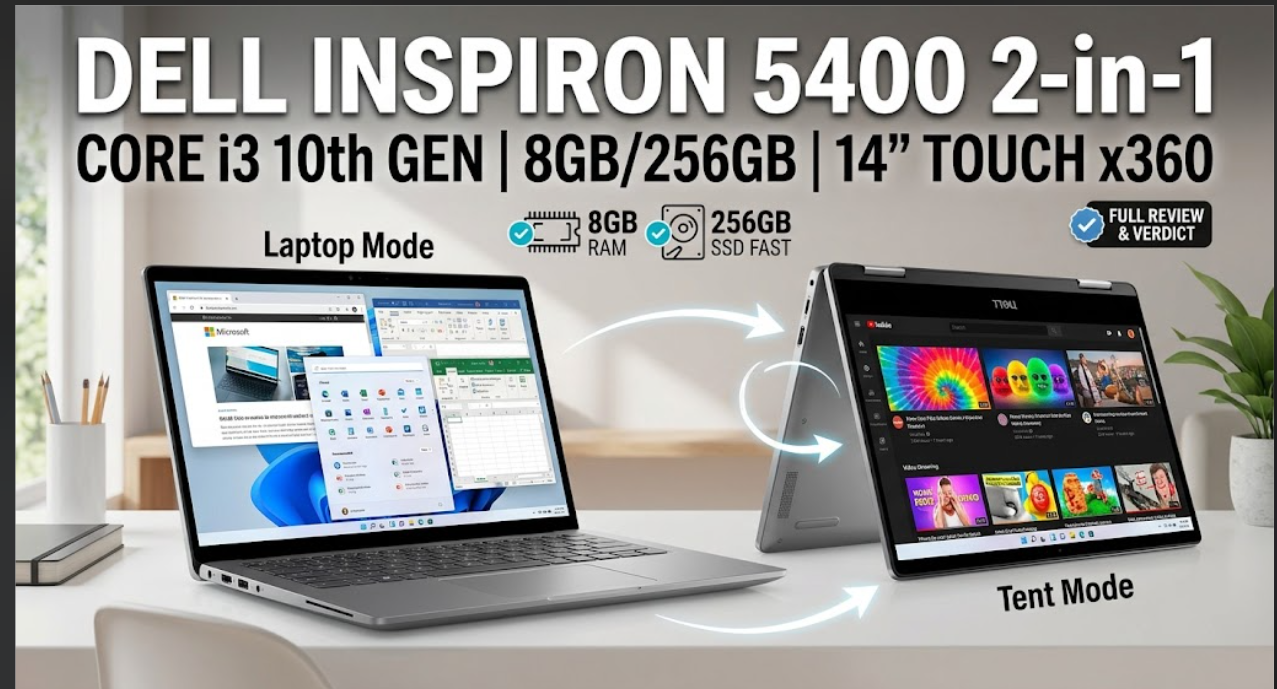
The defining feature of this machine is its 360-degree hinge mechanism. The dual hinges offer smooth resistance, letting you seamlessly rotate the display through four functional modes:
-
Laptop Mode: The classic setup, ideal for typing essays, coding, or managing spreadsheets.
-
Tablet Mode: Folded flat against the back, converting the machine into an interactive touchscreen tablet for reading, sketching, or informal browsing.
-
Tent Mode: An inverted ‘V’ shape with a small footprint, ideal for small desks or bedside tables.
-
Stand Mode: Display faced forward with the keyboard serving as a base, optimized for video calls, streaming movies, or presenting slides.
Weighing in at approximately 1.72 kg (3.79 lbs), it is not the absolute lightest 14-inch device on the market, but it remains portable enough to slip into a backpack for daily commutes without strain Dell Inspiron 5400
Dell Inspiron 5400 Display and Audio: Interactive Visuals
The laptop features a 14-inch Full HD (1920 x 1080) WVA touch display framed by relatively narrow side borders. The Full HD resolution on a 14-inch canvas yields sharp text and clear imagery, making everyday document reading and video playback crisp and enjoyable.
The touch interface is responsive, supporting multi-touch gestures such as pinch-to-zoom and two-finger scrolling. Navigating Windows 10 or Windows 11 using fingers feels natural and precise. Viewing angles are wide thanks to the Wide Viewing Angle (WVA) panel, though outdoor readability in direct sunlight can be somewhat limited due to glass reflections common on touchscreens.
For audio, Dell incorporates Waves MaxxAudio Pro technology paired with bottom-firing stereo speakers. The sound profile delivers clear vocals and decent volume for casual media consumption, Zoom meetings, or podcast listening, though music enthusiasts will still prefer plug-in headphones for deeper bass.
Performance: Reliable Everyday Speed
Under the hood, the Inspiron 5400 runs on an Intel Core i3-10110U processor (10th Gen). This dual-core, four-thread chip operates at a base clock speed of 2.10 GHz, boosting up to 4.10 GHz when demanding tasks arise.
-
Multitasking (8GB RAM): The included 8GB DDR4 RAM ensures smooth operation across everyday multitasking scenarios. You can effortlessly keep 15 to 20 Google Chrome tabs open, stream background audio on Spotify, and work on a Microsoft Word document simultaneously without noticeable slowdowns.
-
Storage Speed (256GB NVMe SSD): Storage speed is often the bottleneck in budget laptops, but Dell avoids this by equipping the 5400 with a 256GB M.2 PCIe NVMe SSD. Boot times are exceptionally fast—taking less than 10 to 12 seconds—and applications launch almost instantaneously.
-
Graphics: Integrated Intel UHD Graphics handles standard multimedia tasks, 1080p video playback, and basic photo editing software smoothly. However, it is important to manage expectations: this is not a gaming laptop or a heavy 4K video editing rig Dell Inspiron 5400.
Keyboard, Trackpad, and Connectivity
The full-sized island-style keyboard provides an enjoyable typing experience. Key travel is well-calibrated with satisfying tactile feedback, allowing for comfortable, long-form typing sessions.
Below the keyboard sits a moderately sized precision touchpad. Gesture recognition in Windows works accurately, and palm rejection prevents accidental cursor jumps while typing.
Dell has ensured users stay connected without relying heavily on dongles. The laptop features an impressive port layout:
-
1 x USB 3.2 Gen 1 Type-C (supports Power Delivery and DisplayPort)
-
2 x USB 3.2 Gen 1 Type-A
-
1 x HDMI 1.4b
-
1 x SD Card Reader
-
1 x 3.5mm Headphone/Microphone Combo Jack
Wi-Fi 6 capability and Bluetooth 5.0 ensure fast wireless connections and low-latency audio pairing.
Battery Life and Charging
Equipped with a 3-cell 40Wh battery, the Dell Inspiron 5400 offers realistic battery life suited for moderate daily schedules. Under routine web browsing, document editing, and video streaming at 50% screen brightness, you can expect around 5 to 6.5 hours of continuous use.
The device also supports Dell’s ExpressCharge technology, which recharges the battery from flat to roughly 80% in about an hour, minimizing downtime when you are on the moveDell Inspiron 5400.
Pros and Cons
| Feature | Pros | Cons |
| Design & Display | Smooth 360-degree hinge, crisp 1080p touch display | Screen reflections under bright outdoor light |
| Performance | Fast boot times via 256GB NVMe SSD, snappy web browsing | Not built for AAA gaming or heavy 3D rendering |
| Portability | Multi-mode flexibility, full suite of physical ports | Slightly heavier than premium ultraportables |
| Usability | Comfortable keyboard and accurate precision touchpad | 256GB storage may feel tight for large media archives |
Frequently Asked Questions (FAQs)
Q1: Is the Dell Inspiron 5400 2-in-1 good for heavy gaming?
No, this laptop relies on integrated Intel UHD Graphics. While it easily handles casual, light 2D games and web-based games, it is not designed to run modern 3D AAA gaming titles smoothly.
Q2: Can I upgrade the RAM and SSD storage on this laptop?
Yes. Unlike many ultra-thin convertibles with soldered components, the Dell Inspiron 5400 features SODIMM slots for RAM upgrades (up to 16GB or 32GB) and a replaceable M.2 NVMe SSD slot if you need more storage space down the line.
Q3: Does the Dell Inspiron 5400 support an active stylus pen?
Yes, the 14-inch touchscreen supports active pen input (such as the Dell Active Pen PN350M or compatible MPP protocol pens), making it useful for digital note-taking, sketching, and document annotation.
Q4: Is an Intel Core i3 10th Gen processor sufficient for everyday tasks?
Absolutely. For web browsing, video calls, office applications, online classes, and media streaming, the 10th Gen Core i3 delivers responsive and lag-free performanceDell Inspiron 5400.
Q5: How long does the battery take to charge?
Thanks to Dell’s ExpressCharge technology, the battery can charge from 0% to around 80% in approximately 60 minutes using the included AC adapter.
Final Verdict: Is It Right for You?
The Dell Inspiron 5400 2-in-1 (Core i3 10th Gen, 8GB/256GB) hits a sweet spot between versatility, performance, and affordability. It delivers everything necessary for core daily tasks—online classes, remote work, media streaming, web research, and light content creation—while offering the modern convenience of a responsive touchscreen tablet mode.
If you are a student, freelancer, or home office user seeking a reliable, multi-functional laptop without breaking the bank, the Inspiron 5400 stands out as a highly practical choice.
Would you like me to adjust any specific sections, or add localized pricing information for your region Dell Inspiron 5400?