



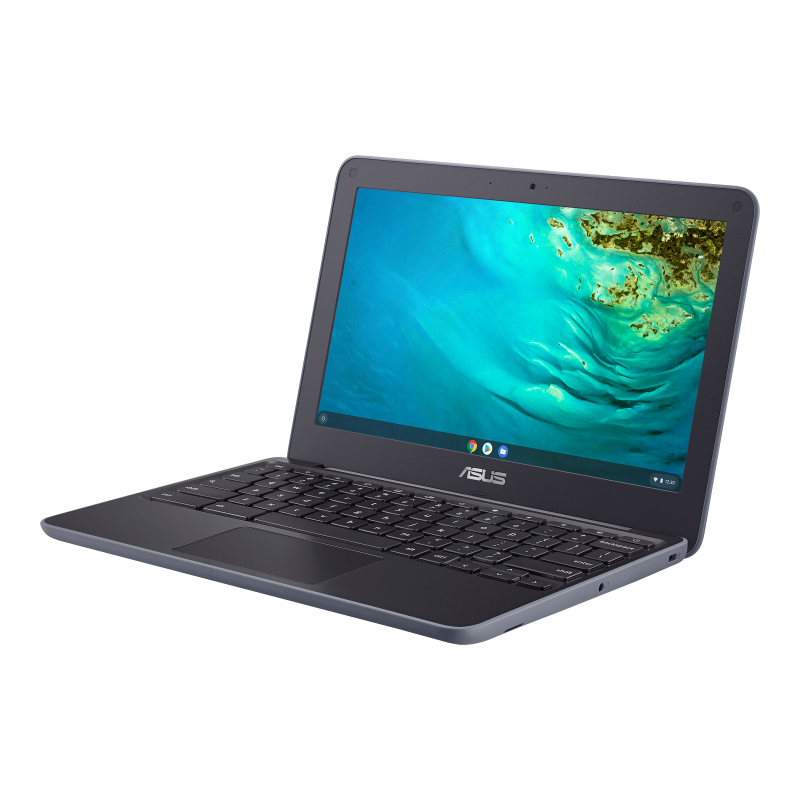
ASUS Chromebook C202S Review | Intel Celeron, 4GB RAM, 16GB Storage & Play Store Support
ASUS Chromebook C202S – A Durable Chromebook for Students and Everyday Use
The ASUS Chromebook C202S is a compact and reliable laptop designed for students, teachers, and everyday users who need an affordable device for learning and daily tasks. Powered by an Intel Celeron processor, 4GB RAM, and 16GB of storage, this Chromebook delivers smooth performance for web browsing, online classes, document editing, and streaming.
Running on ChromeOS, the ASUS Chromebook C202S offers fast boot times, automatic security updates, and access to thousands of Android apps through Google Play Store support. Its durable design and lightweight build make it an excellent choice for school, home, and travel.
Table of Contents
- ASUS Chromebook C202S Overview
- Intel Celeron Performance
- 4GB RAM for Everyday Multitasking
- 16GB Storage and Cloud Integration
- 11.6-inch HD Display
- Play Store Support
- Built-in Webcam for Online Meetings
- Durable and Student-Friendly Design
- Battery Life
- Connectivity Options
- Who Should Buy the ASUS Chromebook C202S?
- Key Features
- Pros and Cons
- Frequently Asked Questions
- Final Verdict
Intel Celeron Performance
The Intel Celeron processor provides reliable performance for everyday computing tasks. It is optimized for ChromeOS, ensuring smooth operation for web-based applications and educational tools.
It is suitable for:
- Web browsing
- Google Docs and Sheets
- Gmail
- Online classes
- Video streaming
- Research
- Homework
- Cloud-based applications
4GB RAM for Smooth Everyday Performance
The 4GB RAM allows users to browse the internet, open multiple Chrome tabs, and run Android applications without significant slowdowns.
Perfect for:
- Students
- Teachers
- Home users
- Office basics
- Google Workspace
- Video conferencing
16GB Storage with Cloud Support
The 16GB built-in storage is designed to work alongside Google Drive, allowing users to save files safely in the cloud.
Benefits include:
- Fast startup
- Quick app loading
- Secure cloud storage
- Automatic file synchronization
- Easy document sharing
11.6-inch HD Display
The 11.6-inch display provides clear visuals while keeping the Chromebook compact and portable.
Ideal for:
- Online learning
- Watching YouTube
- Reading documents
- Web browsing
- Video calls
Its compact size makes it easy to carry between school, home, and work.
Google Play Store Support
One of the biggest advantages of the ASUS Chromebook C202S is its Google Play Store support.
Users can install thousands of Android apps, including:
- Microsoft Office
- Zoom
- Google Meet
- Canva
- Adobe Express
- Gmail
- YouTube
- Google Classroom
This expands the Chromebook’s functionality beyond web browsing.
Built-in Webcam for Online Learning
The integrated webcam makes video communication simple and convenient.
Perfect for:
- Zoom meetings
- Google Meet
- Microsoft Teams
- Online classes
- Remote work
- Virtual interviews
Durable Student-Friendly Design
The ASUS Chromebook C202S is built with durability in mind.
Features include:
- Lightweight body
- Spill-resistant keyboard
- Reinforced edges
- Rugged construction
- Comfortable keyboard
Its robust design makes it ideal for students and classrooms.
Long Battery Life
The Chromebook delivers long-lasting battery life, allowing users to work, study, or browse throughout the day without frequent charging.
Ideal for:
- School
- Travel
- Remote learning
- Office work
- Everyday productivity
Connectivity Options
The ASUS Chromebook C202S includes useful connectivity options such as:
- USB ports
- HDMI
- Wi-Fi
- Bluetooth
- Headphone jack
- SD card reader (model dependent)
These options allow users to connect external devices and accessories easily.
Who Should Buy the ASUS Chromebook C202S?
This Chromebook is perfect for:
- Students
- Teachers
- Parents
- Remote learners
- Home users
- Small business owners
- Travelers
- Everyday internet users
Key Features
- Intel Celeron Processor
- ChromeOS
- 4GB RAM
- 16GB Storage
- 11.6-inch HD Display
- Google Play Store Support
- Built-in Webcam
- Lightweight Design
- Wi-Fi & Bluetooth
- Long Battery Life
Pros
- Affordable Chromebook
- Fast ChromeOS experience
- Google Play Store support
- Durable design
- Lightweight and portable
- Excellent for students
- Long battery life
Cons
- Limited 16GB internal storage
- Not suitable for heavy gaming or video editing
- Small display may not suit users needing a larger screen
Frequently Asked Questions
Is the ASUS Chromebook C202S good for students?
Yes. Its durable design, ChromeOS, and Play Store support make it an excellent laptop for students and online learning.
Does the ASUS Chromebook C202S support Android apps?
Yes. It supports the Google Play Store, allowing you to install thousands of Android applications.
Can I use Microsoft Office on this Chromebook?
Yes. You can use Microsoft Office apps through the Play Store or access Office Online.
Is the ASUS Chromebook C202S good for video calls?
Yes. The built-in webcam works well for Zoom, Google Meet, and Microsoft Teams.
Is this Chromebook suitable for everyday use?
Absolutely. It is ideal for web browsing, streaming, online classes, email, and basic productivity tasks.
Final Verdict
The ASUS Chromebook C202S is a practical and affordable Chromebook designed for students, teachers, and everyday users. With its Intel Celeron processor, 4GB RAM, 16GB storage, 11.6-inch display, Google Play Store support, and built-in webcam, it delivers everything needed for online learning, web browsing, and daily productivity.
If you’re looking for a lightweight, durable, and budget-friendly Chromebook for education or everyday tasks, the ASUS Chromebook C202S is a reliable choice that offers excellent value for money while maintaining smooth performance on ChromeOS.