




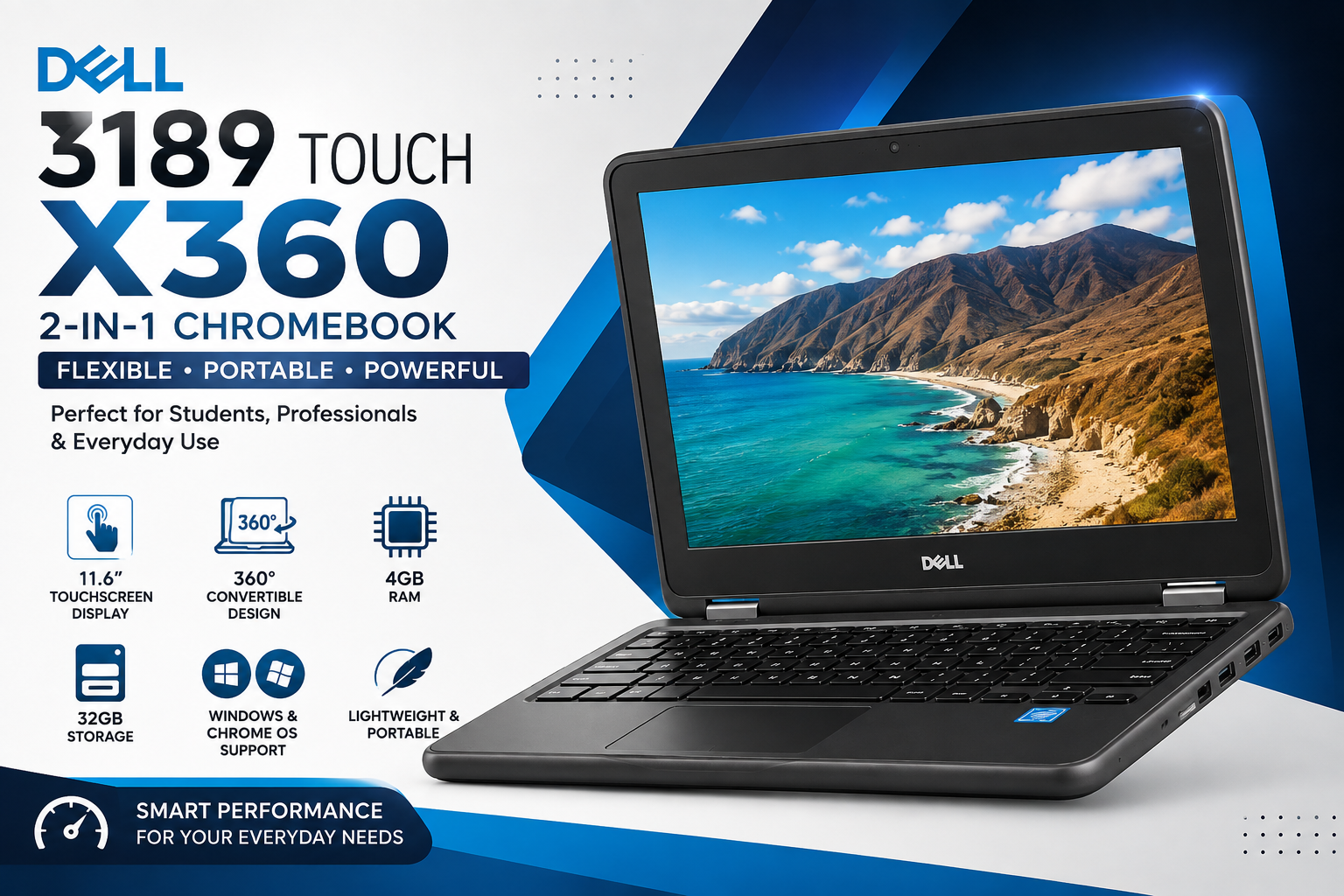
Dell 3189 Touch X360 Chromebook | 4GB RAM | 32GB Storage | Windows & Chrome OS Laptop
The Dell 3189 Touch X360 Chromebook is a compact and versatile 2-in-1 laptop designed for students, professionals, teachers, and everyday users. Featuring an 11.6-inch touchscreen display, 360-degree convertible design, 4GB RAM, and 32GB storage, this Dell laptop offers a practical combination of portability, flexibility, and everyday usability.
Whether you need a laptop for online classes, web browsing, Microsoft Office, email, video conferencing, document editing, or entertainment, the Dell 3189 Touch X360 can handle common computing tasks with ease.
Its convertible design allows you to switch between laptop, tablet, tent, and stand modes, making it especially useful for users who want more flexibility from a compact laptop.
Dell 3189 Touch X360 – Compact and Flexible 2-in-1 Laptop
The Dell 3189 Touch X360 is designed for users who need a lightweight laptop that can adapt to different situations. Its 360-degree hinge allows the screen to rotate completely, giving you multiple ways to use the device.
You can use it as a traditional laptop when working on documents, fold it into tablet mode when reading or browsing, or place it in tent or stand mode when watching videos or giving presentations.
360-Degree Convertible Modes
The Dell 3189 can be used in four convenient modes:
- Laptop Mode: Ideal for typing, studying, office work, and browsing.
- Tablet Mode: Useful for reading, browsing, and touchscreen navigation.
- Tent Mode: Great for presentations and watching videos.
- Stand Mode: Convenient for multimedia and hands-free viewing.
This flexible 2-in-1 convertible laptop design makes the Dell 3189 suitable for both productivity and entertainment.
11.6-Inch HD Touchscreen Display
One of the key features of the Dell 3189 Touch X360 Chromebook is its compact 11.6-inch HD touchscreen display. The touchscreen makes navigation more interactive and convenient, especially when using tablet mode.
The compact display size also contributes to the laptop’s portability, making it easy to carry between home, school, university, office, or meetings.
Touchscreen Display Features
- 11.6-inch HD display
- Touchscreen functionality
- Comfortable viewing for everyday tasks
- Compact and portable screen size
- Suitable for browsing and online learning
- Convenient touchscreen navigation
The touchscreen is particularly useful for students and users who prefer a more interactive computing experience.
Reliable 4GB RAM Performance
The 4GB RAM in the Dell 3189 is suitable for basic everyday computing. It can handle common tasks such as browsing websites, working with documents, checking emails, attending online classes, and using cloud-based applications.
The laptop is best suited for users who need a device for regular productivity rather than demanding professional workloads.
Everyday Tasks You Can Perform
With 4GB RAM, the Dell 3189 can be used for:
- Web browsing
- Microsoft Office
- Google Docs
- Online classes
- Video conferencing
- Document editing
- Presentations
- Social media
- YouTube and video streaming
- Cloud-based applications
For students and home users, this provides a practical setup for everyday computing needs.
32GB Storage for Essential Files
The Dell 3189 Touch X360 comes with 32GB of internal storage, providing space for essential documents, assignments, presentations, and other files.
Because 32GB is relatively limited compared with modern laptops, users who need additional storage can make use of cloud storage services or external storage devices.
Storage Options
You can use the available storage for:
- School assignments
- Word documents
- PDFs
- Presentations
- Small applications
- Photos
- Personal files
Cloud platforms such as Google Drive and OneDrive can also be useful for keeping larger files accessible without filling the laptop’s internal storage.
Windows or Chrome OS – Flexible Operating System Options
A major advantage of the Dell 3189 platform is its flexibility with operating systems. Depending on the specific configuration and installation, users may use Windows or Chrome OS.
Benefits of Windows
Windows can be a suitable choice for users who need access to traditional desktop applications.
Some benefits include:
- Microsoft Office compatibility
- Desktop application support
- Familiar Windows interface
- Traditional file management
- Compatibility with many productivity applications
Benefits of Chrome OS
Chrome OS is designed around simplicity, speed, and cloud-based computing.
Its advantages include:
- Fast and simple user experience
- Google applications
- Cloud-based productivity
- Built-in security features
- Automatic updates
- Easy integration with Google services
Choosing between Windows and Chrome OS depends on your software requirements and preferred working environment.
Dell 3189 Touch X360 for Students
The Dell 3189 Touch X360 Chromebook can be a practical option for students looking for an affordable and portable laptop.
Its compact size makes it easy to carry to school, college, or university, while the touchscreen and convertible hinge provide additional flexibility for studying.
Students can use the laptop for:
- Online classes
- Google Classroom
- Microsoft Office
- Google Docs
- Research
- Assignments
- Presentations
- Educational websites
- Video lectures
- Online meetings
The touchscreen can also make reading and navigating educational content more convenient.
Dell 3189 Touch X360 for Teachers
Teachers and educators can also benefit from a lightweight convertible laptop. The touchscreen and multiple viewing modes make it convenient for preparing lessons, accessing online resources, creating documents, and participating in virtual meetings.
It can be useful for:
- Lesson planning
- Online teaching
- Presentations
- Google Classroom
- Email communication
- Document preparation
- Video conferencing
- Browsing educational resources
Useful Laptop for Home and Everyday Use
The Dell 3189 is not limited to students. Home users can also use this compact 2-in-1 laptop for everyday activities.
It can be used for:
- Internet browsing
- Watching videos
- Checking emails
- Social media
- Online shopping
- Reading
- Basic document work
- Video calls
- Managing personal files
Its small footprint makes it convenient for desks, bedrooms, study areas, and travel.
Business and Office Productivity
For professionals who mainly work with documents, emails, browser-based applications, and online meetings, the Dell 3189 can provide a compact computing solution.
It can be useful for:
- Email management
- Microsoft Office
- Google Workspace
- Online meetings
- Document editing
- Cloud collaboration
- Web applications
- Remote work
- Business communication
However, users working with demanding applications such as advanced video editing, 3D design, or intensive software development should consider a more powerful laptop.
Portable and Travel-Friendly Design
Portability is one of the strongest advantages of the Dell 3189 Touch X360.
Its compact form factor makes it easier to carry compared with larger laptops. Students can place it in a backpack, while professionals can take it to meetings or use it while travelling.
The 360-degree hinge adds functionality without requiring a separate tablet.
Connectivity Options
The Dell 3189 provides connectivity options for everyday accessories and peripherals.
Depending on the exact configuration, connectivity may include:
- USB ports
- HDMI
- Wi-Fi
- Bluetooth
- Headphone/audio connectivity
- SD card reader
These connectivity options make it easier to connect external devices such as keyboards, mice, headphones, displays, storage devices, and other accessories.
Battery Performance for Daily Tasks
Battery performance is an important factor for students and professionals who need a laptop throughout the day.
The Dell 3189 is designed for everyday activities such as:
- Web browsing
- Online learning
- Document work
- Video meetings
- Reading
- Multimedia
Actual battery life can vary depending on the operating system, battery condition, screen brightness, applications, Wi-Fi usage, and overall device condition.
Affordable 2-in-1 Laptop for Everyday Computing
If you are searching for an affordable 2-in-1 laptop, the Dell 3189 Touch X360 offers several useful features in a compact package.
Instead of purchasing a separate laptop and tablet, users can take advantage of the convertible hinge and touchscreen to get different usage modes from one device.
This makes it a practical option for budget-conscious students, home users, and professionals who mainly need basic computing functionality.
Why Choose Dell 3189 Touch X360?
There are several reasons why the Dell 3189 Touch X360 can be a useful choice for everyday users:
- 360-degree convertible design
- 11.6-inch touchscreen display
- 4GB RAM
- 32GB storage
- Compact and portable design
- Multiple usage modes
- Suitable for students
- Useful for online learning
- Suitable for basic office work
- Convenient for web browsing
- Supports everyday multimedia
- Useful connectivity options
- Budget-friendly 2-in-1 design
VISIT OUR WEBSITE FOR BETTER EXPERIENCE
Dell 3189 Touch X360 Key Features
Main Specifications
- Model: Dell 3189 Touch X360
- Type: 2-in-1 Convertible Laptop
- Display: 11.6-inch HD Touchscreen
- RAM: 4GB
- Storage: 32GB
- Design: 360-degree Convertible
- Operating System: Windows / Chrome OS configuration
- Connectivity: USB, HDMI, Wi-Fi, Bluetooth, audio and SD card connectivity
- Ideal For: Students, teachers, home users, professionals, online learning, and basic office work
Who Should Buy the Dell 3189 Touch X360?
The Dell 3189 Touch X360 is particularly suitable for:
Students
Students can use it for assignments, research, online classes, presentations, and educational websites.
Teachers
Teachers can use it for lesson preparation, presentations, email, online teaching, and classroom resources.
Home Users
It is suitable for browsing, streaming, email, social media, and basic personal tasks.
Office Users
Professionals who mainly use browser-based applications, documents, email, and video conferencing can benefit from its compact design.
Travelers
Its portable 2-in-1 design makes it convenient for people who frequently move between locations.
Is Dell 3189 Touch X360 Good for Students?
Yes, the Dell 3189 Touch X360 can be a good budget option for students who need a laptop for basic educational and productivity tasks.
The touchscreen, convertible design, compact size, and 4GB RAM make it suitable for online learning, browsing, documents, presentations, and video classes.
However, students who need demanding applications such as advanced programming environments, professional graphic design, video editing, or engineering software should consider a laptop with more RAM and storage.
Is Dell 3189 Touch X360 Good for Office Work?
The Dell 3189 can handle basic office activities such as:
- Word processing
- Web browsing
- Presentations
- Online meetings
- Google Workspace
- Microsoft Office
For heavier multitasking or demanding professional software, a newer and more powerful laptop may be a better choice.
Is Dell 3189 Touch X360 Good for Online Classes?
Yes. Its compact touchscreen display and convertible design make it useful for online classes.
Students can use it for video meetings, educational websites, Google Classroom, online assignments, document editing, and research.
Final Verdict – Dell 3189 Touch X360
The
Dell 3189 Touch X360
is a practical and affordable 2-in-1 touchscreen laptop for users who prioritize portability, flexibility, and basic everyday computing.
With its 11.6-inch HD touchscreen, 4GB RAM, 32GB storage, and 360-degree convertible design, it is particularly suitable for students, teachers, home users, and professionals who mainly perform lightweight tasks.
Its ability to switch between laptop, tablet, tent, and stand modes gives users additional flexibility compared with a traditional laptop.
If you are looking for a budget-friendly Dell touchscreen laptop for students, online learning, browsing, office work, and everyday use, the Dell 3189 Touch X360 is worth considering.
Frequently Asked Questions
1. What is the Dell 3189 Touch X360?
The Dell 3189 Touch X360 is a compact 2-in-1 convertible laptop with an 11.6-inch touchscreen, 360-degree hinge, 4GB RAM, and 32GB storage.
2. Does the Dell 3189 have a touchscreen?
Yes, the Dell 3189 Touch X360 features a touchscreen display that supports interactive navigation.
3. Can Dell 3189 be used as a tablet?
Yes. Thanks to its 360-degree hinge, the laptop can be folded into tablet mode.
4. How much RAM does the Dell 3189 have?
This configuration of the Dell 3189 comes with 4GB RAM, which is suitable for basic everyday computing and productivity tasks.
5. How much storage does the Dell 3189 have?
This configuration includes 32GB of storage. Users who need additional space can use cloud storage or external storage devices.
6. Is Dell 3189 good for online learning?
Yes. It can be used for online classes, educational websites, Google Classroom, document editing, presentations, and video conferencing.
7. Is Dell 3189 suitable for office work?
The Dell 3189 is suitable for basic office tasks such as email, documents, web applications, presentations, and online meetings.
8. Does Dell 3189 support Windows?
This model can be configured with Windows, depending on the specific device and installation.
9. Can Dell 3189 run Chrome OS?
Yes, Chrome OS configurations are available for this type of Chromebook platform. The exact operating system should be confirmed for the specific device being purchased.
10. Who should buy Dell 3189 Touch X360?
The Dell 3189 is best suited for students, teachers, home users, travelers, and professionals who need an affordable laptop for basic computing and productivity tasks.
Shop Dell 3189 Touch X360
Looking for an affordable Dell 3189 Touch X360 Chromebook with 4GB RAM and 32GB storage? Visit Uz Tech to explore the available laptop and Chromebook options and choose a device that fits your everyday computing needs.