




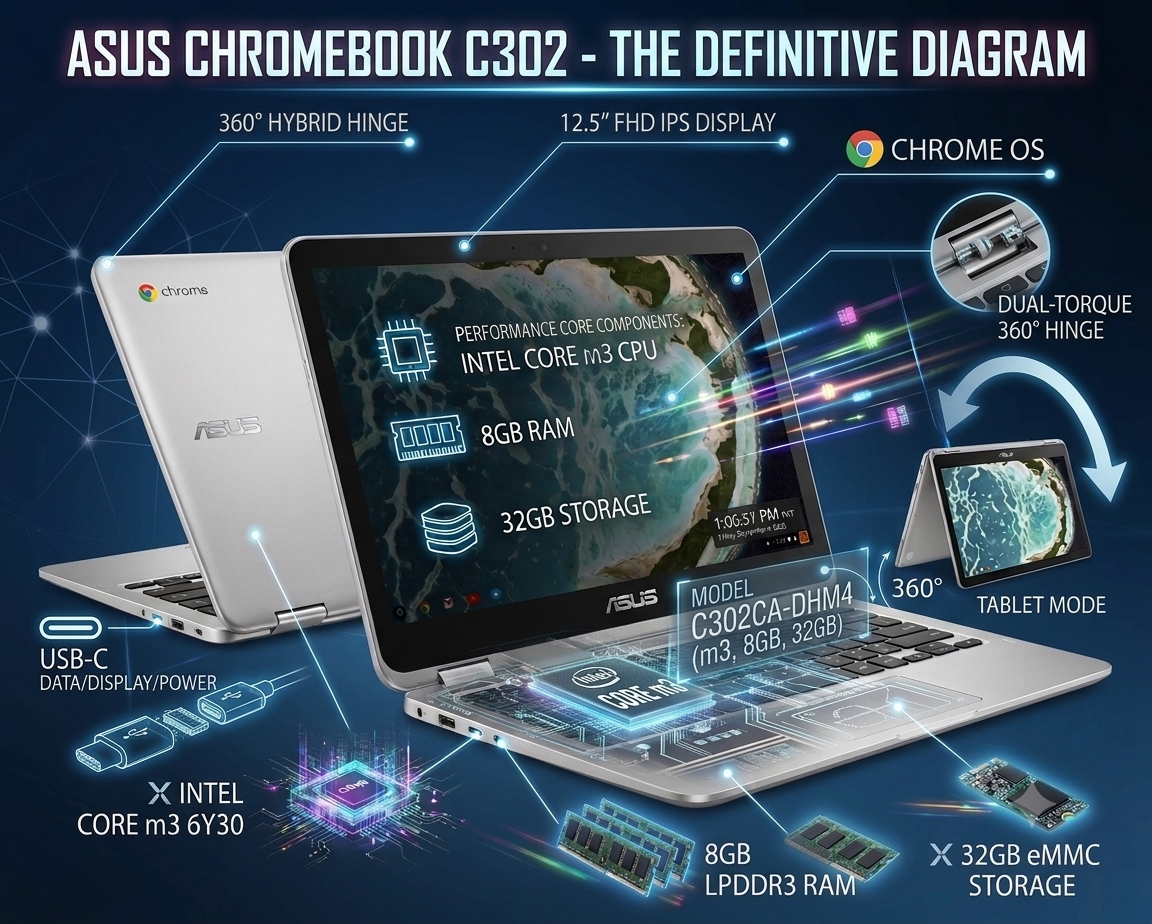
Asus Chromebook C302 Review: The Ultimate Budget 2-in-1 Workhorse
Finding a laptop that bridges the gap between premium build quality, snappy day-to-day performance, and affordable pricing can feel like a daunting challenge. Enter the Asus Chromebook C302—a sleek, aluminum-clad 2-in-1 convertible device specifically engineered to handle daily productivity, media consumption, online education, and remote work tasks without stretching your budget.
Powered by an efficient Intel Core m3-6Y30 processor, paired with a generous 8GB of LPDDR3 RAM, a vibrant 12.5-inch Full HD display, and a versatile 360-degree hinge, this machine stands out as one of the most capable and reliable budget choices available. In this comprehensive review, we examine every aspect of its design, display quality, performance metrics, software integration, and practical usabilityAsus Chromebook C302.
Design and Build Quality: Premium Metal Craftsmanship
When you first hold the Asus Chromebook C302, it becomes immediately apparent that Asus designed this machine to compete directly with high-end ultrabooks.
-
All-Aluminum Chassis: Wrapped in a smooth, anodized silver aluminum body, the laptop resists unwanted flexing and minimizes fingerprint smudges, projecting a clean, professional aesthetic.
-
360-Degree Convertible Hinge: Outfitted with robust dual-gear metal hinges, the screen smoothly rotates through a full 360 degrees. This allows users to easily swap between four distinct usage positions: standard Laptop mode, flipped Tent mode for watching videos, Stand mode for presentations, and fully folded Tablet mode.
-
Ultra-Portable Footprint: Tipping the scales at a lightweight 1.2 kg (2.65 lbs) and measuring a slim 13.7 mm thick, the C302 effortlessly slides into backpacks, totes, or briefcase compartments for seamless mobilityAsus Chromebook C302.
Display, Audio, and Touch Interface
Visual clarity and touch responsiveness are two critical highlights of the Asus C302 experience, making it an excellent medium for both work and playAsus Chromebook C302.
-
Full HD IPS Touchscreen: The 12.5-inch Full HD (1920 x 1080) IPS display delivers wide viewing angles and crisp pixel density. Text appears clean and sharp when reading long articles, while color contrast remains rich for video streaming.
-
10-Point Multi-Touch Support: The glossy glass display features highly responsive touch sensor technology, allowing smooth navigation, swipe gestures, and pinch-to-zoom actions when working in Android applications or tablet orientation.
-
Stereo Speakers: Dual side-mounted speakers deliver balanced stereo sound output. While low-end bass response is minimal due to the slim chassis size, vocal clarity remains clear for video calls, podcasts, and online streaming Asus Chromebook C302.
Hardware Performance & Technical Specifications
At the core of this machine lies a balanced hardware configuration that comfortably outperforms standard entry-level Celeron or Pentium Chromebooks.
| Specification Feature | Technical Details | Practical User Benefit |
| Processor | Intel Core m3-6Y30 (Dual-Core, up to 2.2 GHz) | Quiet, fanless cooling with stable processing power |
| System Memory (RAM) | 8GB LPDDR3 | Smooth multitasking across dozens of active browser tabs |
| Internal Storage | 32GB eMMC Flash Memory | Ultra-fast boot-up times and quick app launches |
| Wireless Connectivity | Wi-Fi 5 (802.11ac) + Bluetooth 4.2 | Stable wireless network connections and accessory pairing |
| Operating System | Google Chrome OS | Automatic background updates and built-in security |
While 32GB of internal storage may seem modest compared to traditional Windows laptops, Chrome OS utilizes cloud-first architecture via Google Drive for document storage. Additionally, physical storage expansion is simple using the onboard MicroSD card slot, which supports cards up to 512GB Asus Chromebook C302.
Keyboard, Precision Touchpad, and Port Selection
A device designed for writing, research, and data entry requires responsive tactile inputs. The C302 excels in providing a comfortable typing and navigation experience:
-
Backlit Chiclet Keyboard: Featuring full-sized keys with 1.4 mm key travel and gentle backlighting, typing remains accurate and comfortable even during late-night work sessions in dim lightingAsus Chromebook C302.
-
Glass Precision Touchpad: The spacious, smooth glass trackpad supports multi-finger Chrome OS gestures (such as three-finger swipe tab switching), executing clicks accurately across its entire surfaceAsus Chromebook C302.
-
Versatile Connectivity Options: The laptop features two full-function USB Type-C 3.1 ports (located on either side for convenient charging, high-speed data transfer, and external display output), a 3.5 mm combo audio jack, and a dedicated MicroSD card reader Asus Chromebook C302.
Battery Endurance & Chrome OS Ecosystem
-
All-Day Battery Performance: Driven by the low-power consumption of the Intel Core m3 processor, the C302 delivers approximately 7 to 9 hours of continuous battery life on a single charge under standard web browsing and document editing usage.
-
Google Play Store Integration: Operating on Chrome OS means instant access to the Google Play Store, enabling users to run millions of Android productivity tools, communication apps (Zoom, Slack, Microsoft Teams), educational software, and light entertainment apps directly on the deviceAsus Chromebook C302.
Who Is the Asus Chromebook C302 Designed For?
-
Students & Educators: An ideal laptop for taking lecture notes, writing assignments, managing online portals, and carrying around campus without back strain.
-
Content Writers & Journalists: Provides a premium tactile keyboard, compact portability, and long battery life for writing on the go.
-
Remote Workers & Freelancers: Great for web-based project management, video conferences, client emailing, and running web-based SaaS tools smoothly Asus Chromebook C302.
Final Verdict
The Asus Chromebook C302 (Core m3 | 8GB RAM | 32GB Storage) remains a standout choice in the budget 2-in-1 market. By pairing a durable metal chassis and a sharp 1080p touchscreen with an upgraded 8GB RAM configuration, it effectively avoids the memory bottlenecks common in low-cost laptops. For users seeking an affordable, highly portable, and responsive laptop for web-centric tasks, this Chromebook offers exceptional value for money Asus Chromebook C302