




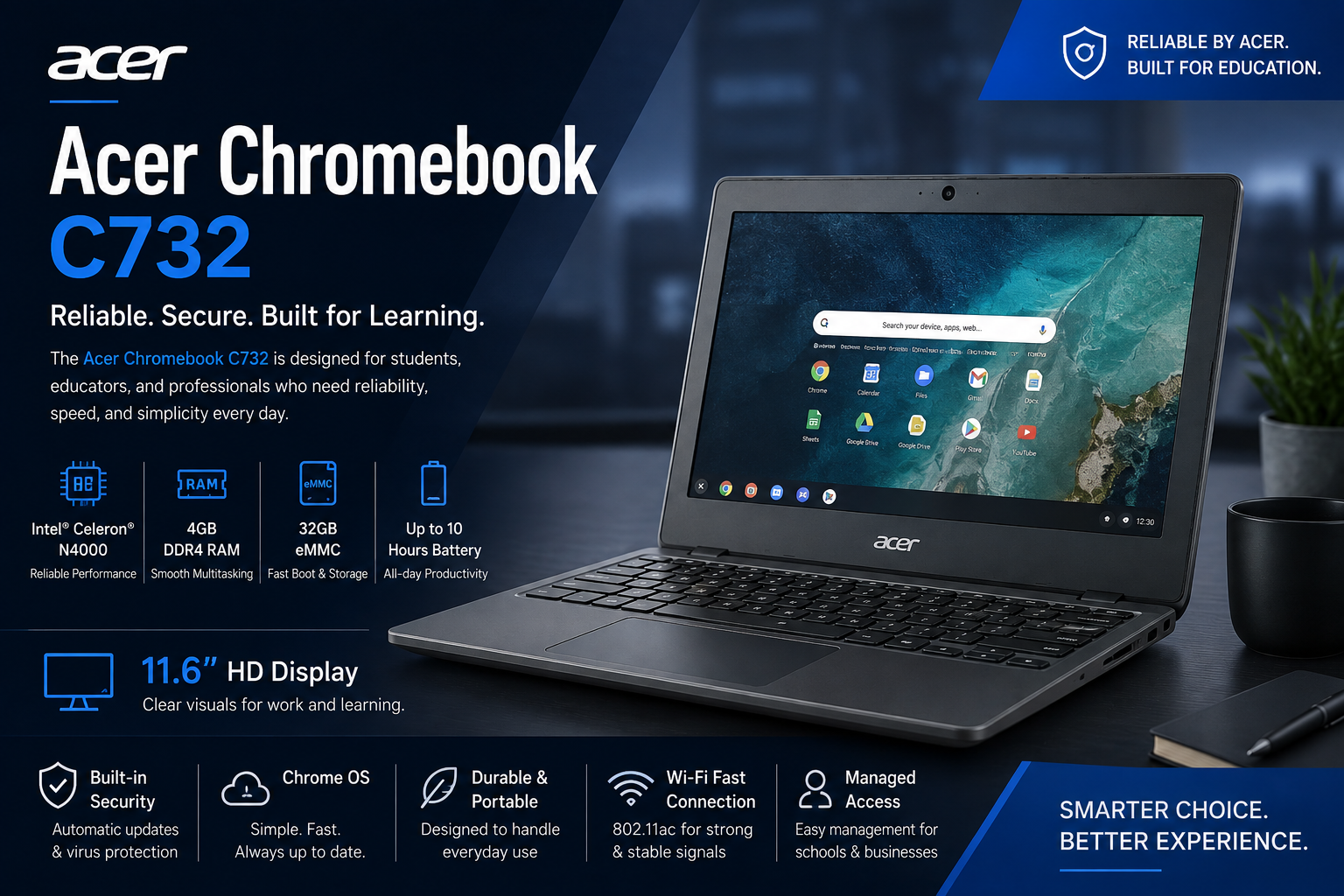
Acer Chromebook C732 Review – 32GB Storage, 4GB RAM & 11.6″ HD Display
The Acer Chromebook C732 is a compact, durable, and budget-friendly Chromebook designed for users who need a simple and reliable device for everyday computing. With 4GB RAM, 32GB storage, an 11.6-inch HD display, and Chrome OS, this Chromebook is particularly suitable for students, teachers, remote workers, and casual users who mainly rely on web-based applications.
Unlike traditional Windows laptops, the Acer Chromebook C732 focuses on cloud computing and lightweight productivity. Chrome OS is designed to provide a fast and straightforward experience, making it easy to browse the internet, work with online documents, attend virtual classes, watch videos, and manage everyday tasks.
If you are searching for an affordable Acer Chromebook with 4GB RAM and 32GB storage, the C732 can be an interesting option for basic computing needs.
Acer Chromebook C732 Design and Build Quality
One of the strongest aspects of the Acer Chromebook C732 is its practical and durable design. The laptop has a compact 11.6-inch form factor, making it easy to carry between home, school, office, or other locations.
Its sturdy construction is especially useful for students and users who frequently move their laptops around. A durable chassis can provide additional peace of mind during everyday use, particularly in environments where a laptop may experience minor knocks or accidental handling.
The compact size also makes the Chromebook convenient for backpacks and smaller workspaces. It does not take up much desk space, and its lightweight design makes it easier to carry throughout the day.
For users who prioritize portability over having a large screen, the Acer C732 Chromebook offers a practical balance between size and usability.
11.6-Inch HD Display
The 11.6-inch HD display is another important feature of the Acer Chromebook C732. While it is smaller than the displays found on many modern laptops, the compact screen contributes to the Chromebook’s portability.
The HD resolution is suitable for common activities such as:
- Web browsing
- Online classes
- Watching videos
- Reading documents
- Writing assignments
- Checking emails
- Using cloud-based applications
- Light productivity work
For students, the smaller display can be convenient because it keeps the overall laptop compact while still providing enough screen space for everyday educational tasks.
Users who regularly work with large spreadsheets, multiple windows, or professional editing software may prefer a larger display. However, for basic browsing and productivity, the 11.6-inch screen is appropriate for the Chromebook’s intended use.
4GB RAM and 32GB Storage Performance
The Acer Chromebook C732 comes with 4GB of RAM and 32GB of internal storage, specifications that are primarily aimed at lightweight computing.
Chrome OS is designed to work efficiently on modest hardware. Instead of relying heavily on traditional desktop software, Chromebook users can take advantage of browser-based applications and cloud services.
With 4GB RAM, the C732 can be suitable for everyday activities such as browsing websites, checking email, working with online documents, watching videos, and attending online classes. Performance will naturally depend on the number and type of applications or browser tabs being used at the same time.
The 32GB storage is relatively limited compared with modern laptops, but Chromebooks are designed with cloud storage and web-based workflows in mind. Users who store most of their files online may find this amount of storage sufficient for basic needs.
If you plan to keep a large collection of videos, photos, games, or other files locally, however, the limited internal storage should be taken into consideration.Product Price In Pakistan Acer Chromebook C732 (4GB RAM + 32GB storage + 11.6″) Rs. 9,000–16,000
Chrome OS Experience
The Chrome OS operating system is one of the main reasons to consider the Acer Chromebook C732. Chrome OS provides a simple interface focused on web browsing, cloud applications, and easy access to online services.
The operating system is generally straightforward to use, making it a good choice for people who do not want to deal with complicated system configurations.
Chrome OS is also designed around Google’s ecosystem, which makes it convenient for users who already use services such as Google Drive, Google Docs, Gmail, and other web-based tools.
For students and remote workers, this can create a simple workflow where documents and other important files can be accessed from different devices.
Google Play Store and Android Apps
Another useful feature associated with compatible Acer Chromebook C732 configurations is Google Play Store support. Access to Android applications can expand the functionality of a Chromebook beyond traditional browser-based tools.
Depending on app compatibility and the specific Chrome OS configuration, users may be able to access applications for:
- Education
- Communication
- Productivity
- Entertainment
- Note-taking
- File management
- Social media
- Online learning
This additional app ecosystem can make the Chromebook more versatile for students and everyday users.
However, users should remember that a Chromebook is still designed primarily around Chrome OS and web-based computing. It is not intended to replace a powerful Windows workstation for demanding professional applications.
Battery Life and Everyday Mobility
Battery efficiency is an important consideration when choosing a Chromebook, particularly for students and people who work away from a desk.
The Acer Chromebook C732 is designed around Chrome OS and low-power hardware, making it suitable for extended everyday use. This can be helpful when attending classes, working remotely, browsing the web, or moving between different locations.
The compact design also contributes to its role as a portable productivity device. Instead of carrying a large and heavy laptop, users can take the smaller Chromebook with them for basic computing tasks.
Actual battery performance can vary depending on factors such as screen brightness, Wi-Fi usage, applications, video playback, and the condition of the battery.
Connectivity and Productivity Features
For everyday productivity, the Acer Chromebook C732 provides the basic functionality expected from a modern Chromebook. Users can connect to the internet, access cloud storage, browse websites, participate in online meetings, and work with web-based productivity applications.
The combination of Chrome OS and cloud services can also help simplify file management. Rather than depending entirely on local storage, users can keep important documents in cloud storage and access them from other compatible devices.
This makes the Acer Chromebook C732 particularly useful for students and remote workers whose daily activities are centered around online platforms.
Who Should Buy the Acer Chromebook C732?
The Acer Chromebook C732 is best suited to users who need a simple, affordable, and portable Chromebook rather than a high-performance laptop.
It can be a good choice for:
- Students attending online classes
- School and college users
- Casual web browsers
- Remote workers with lightweight workloads
- Users who primarily use Google services
- People who need a secondary laptop
- Users looking for a compact and durable device
On the other hand, users who need demanding video editing, advanced gaming, professional 3D applications, or heavy desktop software should consider a more powerful laptop.
Acer Chromebook C732 Pros and Cons
Pros
- Compact and portable 11.6-inch design
- Durable construction
- 4GB RAM for basic everyday tasks
- 32GB storage for cloud-focused workflows
- Simple Chrome OS experience
- Suitable for students and casual users
- Convenient for web-based productivity
- Designed for lightweight computing
Cons
- 32GB storage can feel limited for local files
- 11.6-inch display may be small for multitasking
- Not designed for demanding professional software
- Performance is better suited to basic workloads
- Older Chromebook hardware may have limitations with newer applications and software requirements
Final Verdict
The Acer Chromebook C732 is a practical choice for users who value affordability, portability, durability, and simplicity. Its 4GB RAM, 32GB storage, 11.6-inch HD display, and Chrome OS make it well suited to everyday activities such as browsing, online learning, document editing, email, video streaming, and cloud-based productivity.
Its compact design is particularly appealing to students and users who need a laptop that can easily be carried from one location to another. Chrome OS also provides a straightforward experience for people who primarily work online.
However, buyers should keep the Chromebook’s limitations in mind. The 32GB storage capacity is modest, and the smaller 11.6-inch screen may not be ideal for intensive multitasking. It is also not intended to compete with powerful Windows laptops designed for gaming, professional editing, or demanding applications.
Overall, if your priority is an affordable Acer Chromebook for basic computing, online learning, browsing, and everyday productivity, the Acer Chromebook C732 remains a practical option to consider. Its combination of portability, durability, efficient Chrome OS performance, and simple cloud-focused workflow makes it especially suitable for students, casual users, and anyone looking for a straightforward everyday Chromebook Visit UZ TECH for Better Experience